> ## Documentation Index
> Fetch the complete documentation index at: https://docs.agentlinkops.com/llms.txt
> Use this file to discover all available pages before exploring further.
# Understand link types and AI assessments
> Choose a link type, compare your team's choice with saved page evidence, and understand tags, previous assessments and paused monitoring.
**Link type** helps you organize saved links and see what the page evidence says about them. The Links table shows one type by default. You can open **Compare with AI** when you want to see your team's choice beside the page assessment.
You do not need to choose a model provider or configure a provider budget. A [one-off local check](/guides/first-result) returns link evidence without assigning a type or tags.
## What appears in Link type
Your team's saved setting controls the display:
| Your saved setting | What Link type shows |
| - | - |
| Your team chose a type | That choice, with who set it. |
| Your team deliberately cleared the type | **No type**. The saved page assessment does not fill it back in. |
| Your team has no override | The available page assessment, with its source and evidence state, or a reason no type is available. |
An assessment can describe current or previous page evidence. **Previous assessment** describes saved evidence that is no longer confirmed current. Check its date and reason before relying on it.
## Why two types can both be right
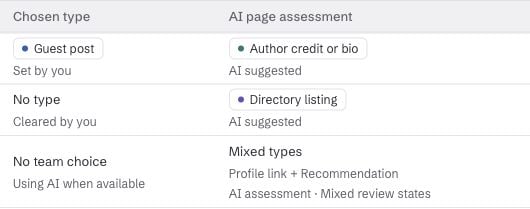
Choose **Compare with AI** above the table to show two columns:
| Chosen type | AI page assessment | How to read it |
| - | - | - |
| Guest post | Author credit or bio | Your team contributed the article; the link appears in its author bio. |
| No type, cleared by your team | Directory listing | The deliberate clear keeps the everyday Link type empty. The assessment remains available for comparison. |
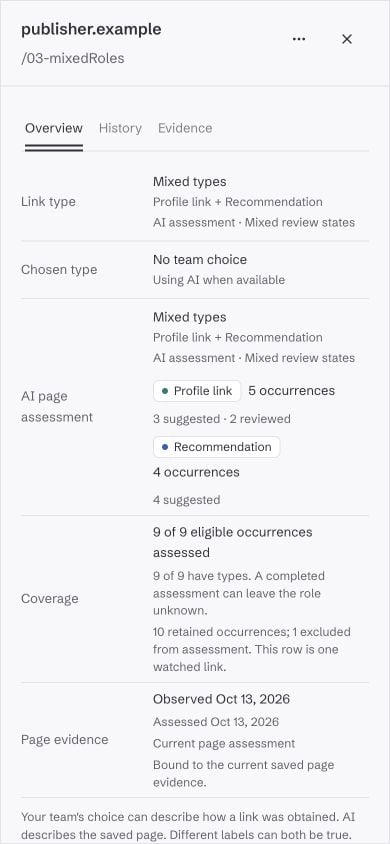
| No team choice | Mixed types | The page has Profile link and Recommendation roles. Open its evidence to inspect the matching links. |
These rows are illustrative. **Chosen type** records how your team describes a placement. **AI page assessment** describes matching links found in saved page evidence. A difference alone does not mean either description is wrong.
 **Tags** are separate colored labels for organization, such as `autumn-campaign` or a client name. They do not change the link type or the page assessment.
## Change your team's choice
If you can edit links, open a saved link's details to choose a type or change its tags.
| Action | Result |
| - | - |
| Choose a type | Save a team choice that takes precedence in Link type. |
| Clear type | Keep Link type empty until your team changes that setting. |
| Use AI again | Remove the team override and use the existing page assessment when one is available. |
**Use AI again does not run a new classification.** It also does not approve a suggestion. If no assessment is available, the table still explains why a type is missing.
## Read the evidence state
Open the link's details to inspect the evidence date, assessment coverage and any reason a result is missing.
| State | What it tells you |
| - | - |
| Not classified yet | No classification result has been recorded for the eligible page evidence. It does not mean work is queued. |
| Classifying | Classification work is pending. It has not produced a completed result. |
| Classification unavailable | The assessment could not be read. It does not establish that no classification exists. |
| Page unavailable or an inconclusive page check | The latest attempt could not establish the page contents. Older saved evidence may still exist. |
| Previous assessment | A retained assessment describes older evidence. A newer check may have changed, missed or been unable to confirm the page, or the saved evidence may have expired or become unavailable. |
| No page role determined | Recorded classification work has not supplied a role. A completed assessment can still leave the type unknown. |
The source matters too: **AI suggested** is provisional; **Reviewed** has a recorded manual review; **AI classified** means AgentLinkOps accepted that assessment automatically. Reading any of these states does not approve a suggestion or start classification.
A page can contain several matching links. **Mixed types** means they have different assessed roles. **2 of 5 have types** means three eligible occurrences still lack a type. Assessment coverage and type coverage can differ: an assessed occurrence can remain unclassified.
**Tags** are separate colored labels for organization, such as `autumn-campaign` or a client name. They do not change the link type or the page assessment.
## Change your team's choice
If you can edit links, open a saved link's details to choose a type or change its tags.
| Action | Result |
| - | - |
| Choose a type | Save a team choice that takes precedence in Link type. |
| Clear type | Keep Link type empty until your team changes that setting. |
| Use AI again | Remove the team override and use the existing page assessment when one is available. |
**Use AI again does not run a new classification.** It also does not approve a suggestion. If no assessment is available, the table still explains why a type is missing.
## Read the evidence state
Open the link's details to inspect the evidence date, assessment coverage and any reason a result is missing.
| State | What it tells you |
| - | - |
| Not classified yet | No classification result has been recorded for the eligible page evidence. It does not mean work is queued. |
| Classifying | Classification work is pending. It has not produced a completed result. |
| Classification unavailable | The assessment could not be read. It does not establish that no classification exists. |
| Page unavailable or an inconclusive page check | The latest attempt could not establish the page contents. Older saved evidence may still exist. |
| Previous assessment | A retained assessment describes older evidence. A newer check may have changed, missed or been unable to confirm the page, or the saved evidence may have expired or become unavailable. |
| No page role determined | Recorded classification work has not supplied a role. A completed assessment can still leave the type unknown. |
The source matters too: **AI suggested** is provisional; **Reviewed** has a recorded manual review; **AI classified** means AgentLinkOps accepted that assessment automatically. Reading any of these states does not approve a suggestion or start classification.
A page can contain several matching links. **Mixed types** means they have different assessed roles. **2 of 5 have types** means three eligible occurrences still lack a type. Assessment coverage and type coverage can differ: an assessed occurrence can remain unclassified.
 ## Keep monitoring status separate
**Paused** means scheduled monitoring is paused for that saved link. It preserves classifications, team choices and tags. It does not tell you whether classification work is running or whether an assessment is current. Read [monitoring and evidence history](/guides/monitor-changes) for the latest check and its date.
## Read types with an agent or the API
Saved-link reads and exports use `category_contract: "link-category-v1"`:
| Field | Use it for |
| - | - |
| `chosen_category` | The team's `chosen`, `cleared` or `automatic` display setting and its write revision. |
| `page_assessment` | Assessed roles, review state, evidence dates, currentness and coverage. |
| `display_category` | The resolved everyday Link type, its source and why it is shown. |
These fields remain separate in concise and detailed results. **Reading them does not fetch a page, run classification or change a choice.** Legacy `type` and `type_source` fields are compatibility values; use the category contract to interpret the table.
Read from your [connected workspace](/guides/connect-cli). This example finds a current Profile link role, including one within Mixed types:
```bash theme={null}
npx -y agentlinkops call list_link_watches \
--args '{"projectId":"YOUR_PROJECT_ID","category":"profile_website","categoryScope":"page_role","assessmentScope":"current","format":"detailed"}'
```
Replace the project ID. The read requires `watches:read`. When setting a scope, supply `category` or `categoryState`.
| Filter | Scope |
| - | - |
| `categoryScope: "shown"` | The resolved displayed category. Team choices and deliberate clears take precedence. |
| `categoryScope: "page_role"` | Any assessed occurrence role, even when the display uses a team choice or Mixed types. Guest post is a team choice, not an AI page role. |
| `assessmentScope: "current"` | Current assessments; this is the default. With shown scope, team choices can also match. |
| `assessmentScope: "previous"` | Previous page assessments. With shown scope and a supplied `category`, this selects displayed previous AI evidence. Team choices are excluded from that category filter. |
Filters apply before counting and pagination. Reading previous evidence does not refresh it. The legacy `type` filter retains its compatibility scope.
Use [set\_link\_type](/reference/commands/set_link_type) to choose a `type`, deliberately clear it with `type: null`, or return to AI display with `intent: "automatic"` and the current `chosen_category.revision`. A stale revision requires a fresh read before retrying. [Tag operations](/reference/commands/tag_links) organize links independently.
See [saved-link fields and filters](/reference/commands/list_link_watches) for the full contract and [availability](/capability-status) for release boundaries.
This documentation is built and hosted on [Mintlify](https://mintlify.com), a developer documentation platform.
## Keep monitoring status separate
**Paused** means scheduled monitoring is paused for that saved link. It preserves classifications, team choices and tags. It does not tell you whether classification work is running or whether an assessment is current. Read [monitoring and evidence history](/guides/monitor-changes) for the latest check and its date.
## Read types with an agent or the API
Saved-link reads and exports use `category_contract: "link-category-v1"`:
| Field | Use it for |
| - | - |
| `chosen_category` | The team's `chosen`, `cleared` or `automatic` display setting and its write revision. |
| `page_assessment` | Assessed roles, review state, evidence dates, currentness and coverage. |
| `display_category` | The resolved everyday Link type, its source and why it is shown. |
These fields remain separate in concise and detailed results. **Reading them does not fetch a page, run classification or change a choice.** Legacy `type` and `type_source` fields are compatibility values; use the category contract to interpret the table.
Read from your [connected workspace](/guides/connect-cli). This example finds a current Profile link role, including one within Mixed types:
```bash theme={null}
npx -y agentlinkops call list_link_watches \
--args '{"projectId":"YOUR_PROJECT_ID","category":"profile_website","categoryScope":"page_role","assessmentScope":"current","format":"detailed"}'
```
Replace the project ID. The read requires `watches:read`. When setting a scope, supply `category` or `categoryState`.
| Filter | Scope |
| - | - |
| `categoryScope: "shown"` | The resolved displayed category. Team choices and deliberate clears take precedence. |
| `categoryScope: "page_role"` | Any assessed occurrence role, even when the display uses a team choice or Mixed types. Guest post is a team choice, not an AI page role. |
| `assessmentScope: "current"` | Current assessments; this is the default. With shown scope, team choices can also match. |
| `assessmentScope: "previous"` | Previous page assessments. With shown scope and a supplied `category`, this selects displayed previous AI evidence. Team choices are excluded from that category filter. |
Filters apply before counting and pagination. Reading previous evidence does not refresh it. The legacy `type` filter retains its compatibility scope.
Use [set\_link\_type](/reference/commands/set_link_type) to choose a `type`, deliberately clear it with `type: null`, or return to AI display with `intent: "automatic"` and the current `chosen_category.revision`. A stale revision requires a fresh read before retrying. [Tag operations](/reference/commands/tag_links) organize links independently.
See [saved-link fields and filters](/reference/commands/list_link_watches) for the full contract and [availability](/capability-status) for release boundaries.
This documentation is built and hosted on [Mintlify](https://mintlify.com), a developer documentation platform.