
What uses the allowance
Source and destination checks share one allowance. See concepts for reserved, consumed and released checks.
Find backlinks searches and competitor lookups also share a daily search limit, which resets at 00:00 UTC. A search counts in full while it runs, so the searches left can go up when it finishes.
Before you start, in the app
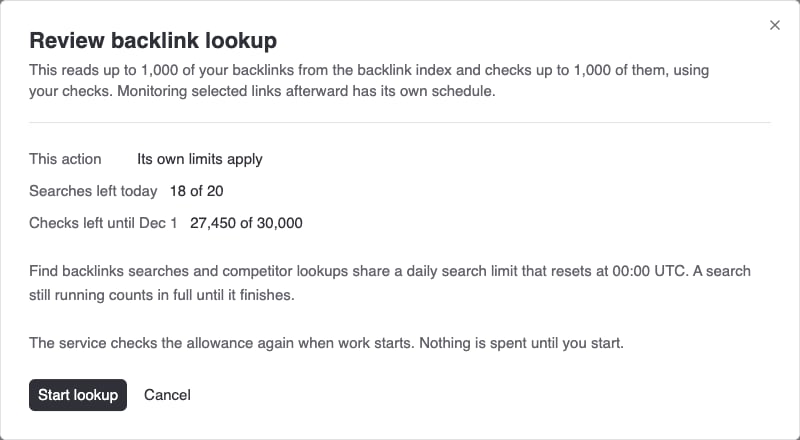
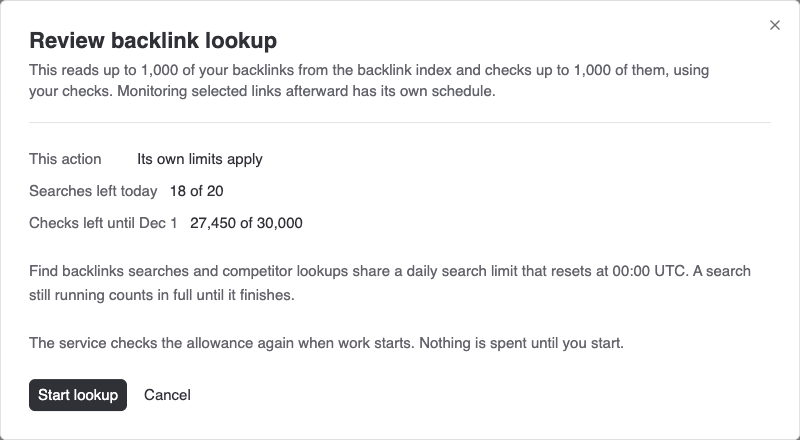
When you check selected links, add or import links for checking or monitoring, use Add a page or watch the pages your links point to from Your pages, a confirmation shows what the action uses and what is left. Monitoring shows the scheduled checks until your allowance resets and how many links you monitor against your plan. Your own pages have their own count against the same plan limit. The quoted action starts after you confirm. Find my backlinks and competitor lookups ask you to confirm too. The confirmation says how many backlinks the lookup reads, how many of them it checks and what you have left: checks, or credits on a shared-credit plan. It also shows the searches left today. With none left, a new lookup can’t start; try again after 00:00 UTC. A competitor lookup checks none. Unless shared-credit protection is active, the confirmation doesn’t warn when the lookup’s checks would pass what is left. With that protection on, Find my backlinks says the lookup includes its initial link checks instead of giving the counts. If a check or monitoring action would pass what is left, the confirmation says so. Scheduled checks past the allowance wait until it resets; a check you start yourself past it is refused, so try again after the reset. If a trial hasn’t started, no plan is active or billing is on hold, the confirmation says that instead of a reset date and a lookup can’t start. No checks run until it’s resolved in Settings › Plan. An import or selection can include records you already monitor. The confirmation shows requested additions when the current count is known and warns when they might exceed your plan’s limit. Read the save result to see which records were added, already existed or were refused. A selection of active and paused records can partly succeed. If every selected record needs a slot and none can start monitoring under the current limit, the confirmation stops the action. If the quote fails to load or expires, refresh it before confirming. Active watches and saved campaign prospects share the workspace’s watch slots. Readwatch_capacity.available_slots in get_workspace to see room for new records. Watch capacity changes when a slot is freed. The monthly reset applies to checks.
Workspace owners and administrators with access to all websites can turn on My workspace uses 80% of its check budget in Settings › Email alerts. After completed checks reach the threshold, your email preferences allow at most one budget alert per UTC month. If a delivery is eligible, it follows your email schedule and shows checks used, the limit and the reset time.
What’s left, next to each action
A short line by these actions shows what you have left, so you can see it before you open the confirmation:- Find my backlinks: checks left and searches left today.
- Analyze on Competitors: searches left today.
- Monitor on a search, an import or Bing backlinks: checks left and the links you monitor.
- Check selected links in Links: checks left. The Add link, Add a page and Import links dialogs, and the button that watches the pages your links point to, show checks left and the links or pages you monitor.


Before you start, from an agent
Callestimate_usage with the action and selection you are about to run. It reads only.
estimate in credits. All other plans get an allowance with the checks the action uses (maximumChecks), the checks left (remaining), what remains after it (afterActionChecks), the reset date (resetsAt), the links you monitor (links) and your monitored pages (pages). For monitoring, scheduledChecks counts the runs until the reset. To quote a new page of your own, pass "subject": "target". A null value can mean unknown, not applicable, or no limit; it never means zero. When no monthly check limit applies, limit and remaining are null. If the allowance cannot be read, used is null too. For a lookup or scan, covered is false: read that action’s own limits from its prepare step.
A lookup quote also carries searches, on every plan: perDay, remainingToday and resetsAt for the daily search limit that Find backlinks searches and competitor lookups share. When searches.remainingToday is 0, a new search can’t start before searches.resetsAt. searches is null when this deployment has no hosted search limit.
Three fields say whether the action can go ahead:
fitsistruewhen every requested check fits what is left.falseis a warning: scheduled checks past the allowance wait for the reset, and checks you request past it are refused until then.blockedistruewhen the selected records all need to start monitoring and none can fit under the current limit (blockedReason). Without selected record IDs,addingIsUpperBound: truemarksaddingandoverLimitas upper bounds. Read the save result for what was added or already existed. A selection of active and paused records can partly succeed.checksStoppedBynames a trial, plan or billing hold. Checks are refused until it’s resolved, andresetsAtisnull. Read this field even whenblockedisfalse; a billing hold and the monitored-record limit can each stop work.
initial_check, read it for the first check result. New import_link_watches receipts show check_budget at save time. Read first_checks_deferred.count for the number of first checks held by quota and first_checks_deferred.deferred_until for the reset date when available. If no first checks were deferred, the new receipt returns null for first_checks_deferred. Replays return the original receipt, which may omit both fields.
Tell the person what the action uses and what is left. Ask first unless they’ve already approved this action and its spend. get_usage has the period totals.
While work runs
Check jobs, candidate verification batches, runs read withget_discovery_run, Find backlinks searches read with get_domain_baseline and competitor lookups read with get_competitor_supplier_inventory carry a progress block. The app reads the same block:
doneandtotalcount the work so far.totalisnulluntil it is known, andpercentnever reads 100 before a result exists.- For imports and discovery runs,
lastProgressAtis the finish time when known, otherwise the start time, with creation time as fallback. Their progress clock does not advance with each row. Check jobs and batches use their latest available update, falling back to creation time. A Find backlinks search or competitor lookup counts the links saved so far while it reads the backlink index; a Find backlinks search then counts checks done of checks selected. It moves when links land or a check finishes. phase: "stalled"means the job stopped moving. It may still finish, and its result shows when it does. Readget_check_jobagain later instead of starting a duplicate check.- A job reads as stalled after it goes without moving for 10 minutes (one check, or a search reading the backlink index), 15 minutes (a candidate batch, or a search checking the links it found) or 30 minutes (an import or a run read with
get_discovery_run, timed from when it started).stalledReasonsaysretry_pendingwhen a check is waiting for another try, andreconciliation_requiredwhen a search needs a check on our side before it can finish. - In the app, stalled work reads Not progressing since the time it last moved, with the counts so far. On Competitors, a stalled lookup reads Lookup not progressing. On Find backlinks, a search waiting on a check on our side reads Couldn’t confirm this search.